Data privacy
The assistant sends each request to the model provider you chose in Choose a model provider.
Where requests go
QueryLane sends requests from your Mac straight to the provider's API address, or to the Base URL you set. They do not pass through a QueryLane server. The provider's own terms apply to what it receives.
With a local server such as Ollama or LM Studio on localhost, prompts and data stay on your Mac. If Base URL points to another machine, the data goes to that machine.
What the model receives
Every request contains your message and the earlier messages of the chat. When a chat grows too long, older messages are replaced with a summary.
Depending on the chat, the request also contains:
- in a job chat: the job name, description and variables, every step with its code, and the names and types of the data sources;
- in a connection chat: the connection name and type, the open table or collection, and the jobs that use the connection;
- database schemas, when Include database schemas in context is on. Full schemas include fields, types, samples and indexes. Structure only includes table names and key fields;
- the items you add with
@, such as run results, table samples or another job with its step code; - the results of the tools the assistant calls.
The assistant does not receive saved connection passwords. Connections reach it with passwords, tokens and other secret fields replaced by [REDACTED]. The values of secret variables, and of variables whose names contain words such as token, key or password, are replaced the same way.
Step code is sent as written. Keep credentials in secret variables, not in the code.
Choose what data the model sees
Data for AI in Settings > AI decides what happens to data values:
| Option | What the model gets |
|---|---|
| Structure only | Field names and row counts. Sample values are removed from schemas, and rows are left out. |
| Anonymized samples | The default. Rows keep their shape, and values are replaced with placeholders. |
| Real samples | Real values from your tables and results. Use it only with a model you trust. |
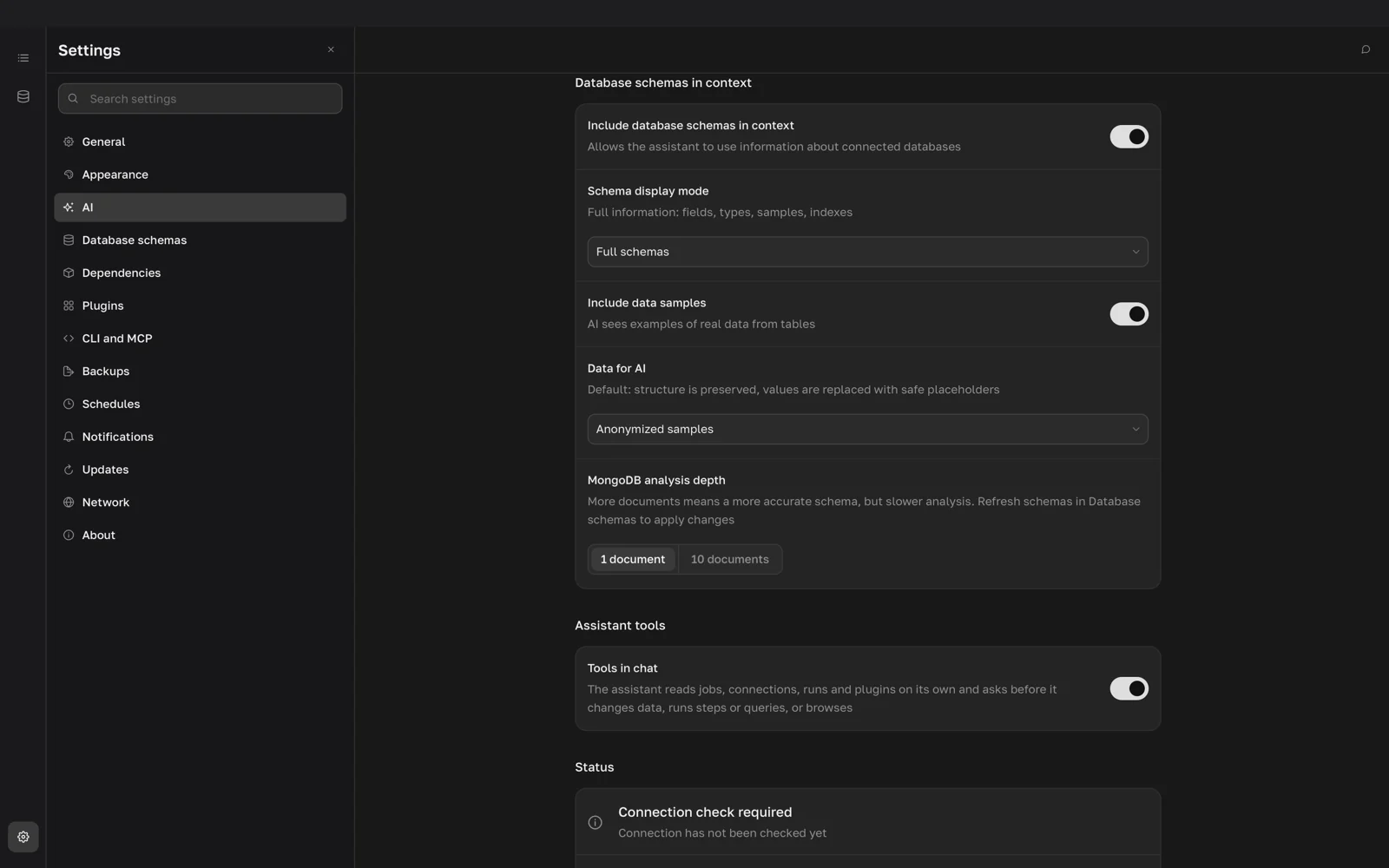
The Data for AI row appears when Include database schemas in context is on, Schema display mode is Full schemas, and Include data samples is on. The chosen option applies to tool results even when the row is hidden. Each provider keeps its own Data for AI option, so check it after you switch providers.
Anonymized samples works as follows:
- fields whose names look like secrets become
[REDACTED]; - emails, phone numbers, names and addresses become placeholders such as
user_3f2a91c0@example.test; - other text becomes
text_followed by a short hash, and equal values get equal placeholders; - numbers, dates, URLs and IDs get substitute values, and lists inside a row are cut to three items.
The option covers schema samples, the rows you add with @, and rows returned by the query and result tools (querylane_db_query_execute, querylane_db_result_page, querylane_result_sample). Other tool results, such as job definitions, run diagnoses, error details and plugin output, are sent as they are, apart from the secret redaction above.
Images that tools return, such as rendered charts and plugin screenshots, go to models that accept images. Data for AI does not change images.
Agents connected over MCP
Data for AI applies only to the built-in assistant. An agent connected over MCP receives real rows, and so does the model provider of that agent.
Where your API key is stored
QueryLane saves API keys in the settings file of the current profile, without encryption and outside the macOS Keychain. For the main profile, the file is:
~/Library/Application Support/app.querylane.desktop/profiles/main/stores/settings.jsonQueryLane sends a key only in requests to its provider or to the Base URL you set for that provider. Reset in Settings > AI removes the keys of all providers. A backup made in Settings > Backups includes the keys when AI settings is selected; the backup file is encrypted.
Chats are saved in the same folder, in ai.json.